.png)
Seamless Virtual Meetings: Essential Video Conferencing Tips
- sky wire broadcast

- Nov 11, 2025
- 4 min read
Updated: 3 hours ago
Mastering Video Conferencing: 10 Tips for Seamless Virtual Meetings
In today’s hybrid and remote working world, video conferencing has become the core of communication. Whether it’s for business presentations, client pitching, training sessions, or team collaboration, virtual meetings allow us to connect from anywhere. However, not every video meeting runs smoothly. Poor audio, technical glitches, lack of engagement, and distractions can affect the productivity and overall outcome of the meeting.
To help you make every virtual meeting smooth, productive and professional & here are 10 actionable tips for mastering video conferencing.
1. Importance of Effective Communication in Virtual Meetings
Clear communication is the foundation of a successful virtual meeting. Unlike in-person meetings, online communication lacks body language and natural interaction cues. Therefore, speak clearly, listen actively, and allow time for participants to respond. Encourage questions and feedback to ensure every participant feels involved and aligned with the meeting goal.
2. Choosing the Right Video Conferencing Tool
Selecting the right platform impacts the meeting experience. Tools like Zoom, Microsoft Teams, Google Meet, and Webex each offer unique benefits such as screen sharing, meeting recording, breakout rooms, and collaboration features. Choose software that meets your requirements in terms of user capacity, reliability, integrations, and ease of use.If your meetings involve presentations and Remote PTZ Camera Control setups, choose platforms that support webinar mode and real-time screen collaboration.
3. Preparing Your Environment for a Professional Appearance
Your meeting environment speaks volumes about your professionalism.Follow these simple steps:
Choose a quiet, well-lit space.
Use front-facing light (avoid backlighting).
Declutter your background or use a branded virtual background.
Position your camera at eye level.
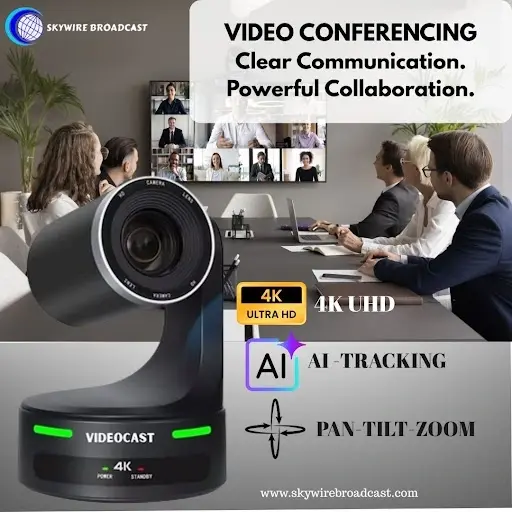
For optimal quality, external webcams and 4K PTZ camera significantly enhance clarity—especially in corporate setups or presentation environments.
4.Upgrade Your Setup with AI-Powered PTZ Camera
While a basic webcam works for casual meetings, professional video conferencing requires high-quality video and more control. This is where AI-powered PTZ (Pan–Tilt–Zoom) camera make a huge difference. Unlike traditional webcams, PTZ cameras automatically track the speaker, adjust framing, and maintain focus—even if you move around during presentations or trainings. AI-based auto-framing ensures that you always remain in the center of the frame, giving the meeting a broadcast-level visual experience. For boardrooms, classrooms, and hybrid work environments, PTZ cameras offer the flexibility to zoom in on presenters, focus on a group, or switch to different angles with a single click. This level of automation allows you to concentrate on the meeting instead of managing the camera manually.
5. Tips for Engaging Participants During Meetings
To avoid passive attendance, engage your audience by:
Asking questions regularly
Using emoji reactions or polls
Encouraging participants to turn on cameras
Using names when addressing attendees
The more interactive your meeting is, the better your outcomes will be.
6. Managing Technical Issues: Best Practices
Technical problems can derail a meeting quickly. Avoid them by:
Testing your microphone, camera, and internet connection beforehand
Using a wired internet connection for stable connectivity
Keeping a backup audio device ready
Mute notifications and close unnecessary applications to prevent lag and distractions.
7. Setting an Agenda for Productive Meetings
A structured meeting always performs better than an open conversation. Share the agenda in advance so attendees know:
The meeting purpose
Expected outcomes
Topics to discuss
What they need to prepare
Timebox each section to ensure topics don’t overrun.
8. Recording and Sharing Meeting Outcomes
Enable the recording feature to capture the session for future reference. Share it with absentees or team members who need the information later. Clip key highlights or important decisions to make it easy for busy stakeholders to catch up.
9. Follow-Up Strategies After the Meeting
Follow-up reinforces clarity. Within 24 hours:
Share meeting notes
Assign action items with deadlines
Attach relevant documents or recordings
This ensures every participant stays aligned with expectations.
Conclusion: Elevating Your Virtual Meeting Experience
Mastering video conferencing system isn’t about having expensive equipment — it’s about preparation, communication, and engagement. With the right setup, agenda and follow-up system, virtual meetings can be just as effective as in-person ones. Apply these 10 tips to make every meeting more productive, efficient and impact.
FAQ- Video Conferencing
What is video conferencing and why is it important for businesses?
Video conferencing is a digital communication method that allows teams to connect remotely through video and audio. It is essential for businesses to conduct meetings, presentations, and collaborations efficiently without geographical limitations.
Which is the best video conferencing platform for professional meetings?
The best platform depends on your needs. Popular options like Zoom, Microsoft Teams, and Google Meet offer features such as screen sharing, recording, and team collaboration.
How can I improve video quality in virtual meetings?
To enhance video quality, use proper lighting, a high-resolution camera, stable internet, and professional equipment like 4K webcams or PTZ cameras for sharper and more dynamic visuals.
What are PTZ cameras and how do they improve video conferencing?
PTZ (Pan-Tilt-Zoom) cameras provide automated tracking, zoom control, and wide coverage, making them ideal for professional environments like boardrooms, classrooms, and live presentations.
How can I make virtual meetings more engaging?
Engagement can be improved by asking questions, using polls, encouraging video participation, and addressing attendees by name to create an interactive experience.
What are common technical issues in video conferencing and how to fix them?
Common issues include poor audio, lag, and connectivity problems. These can be resolved by testing equipment beforehand, using a wired internet connection, and keeping backup devices ready.
Why is setting a meeting agenda important for virtual meetings?
A clear agenda ensures structured discussions, saves time, and helps participants stay focused on key objectives and outcomes.
How do I create a professional background for video calls?
Choose a clean, well-lit space, avoid clutter, use neutral or branded backgrounds, and position your camera at eye level for a polished appearance.
Should I record video meetings for future use?
Yes, recording meetings helps in documentation, allows absent members to catch up, and ensures important discussions and decisions are not missed.
What are the best follow-up practices after a virtual meeting?
Effective follow-up includes sharing meeting notes, assigning action items, setting deadlines, and providing access to recordings or supporting documents.


Comments