The Future of Video Switchers in Hybrid and Online Events
Updated: Apr 6
The world of live events has changed dramatically in recent years. From traditional in-person gatherings, we’ve moved toward hybrid and fully online events where audiences can join from anywhere in the world. Whether it’s a corporate conference, a church service, or a product launch, the demand for seamless video production has never been higher.
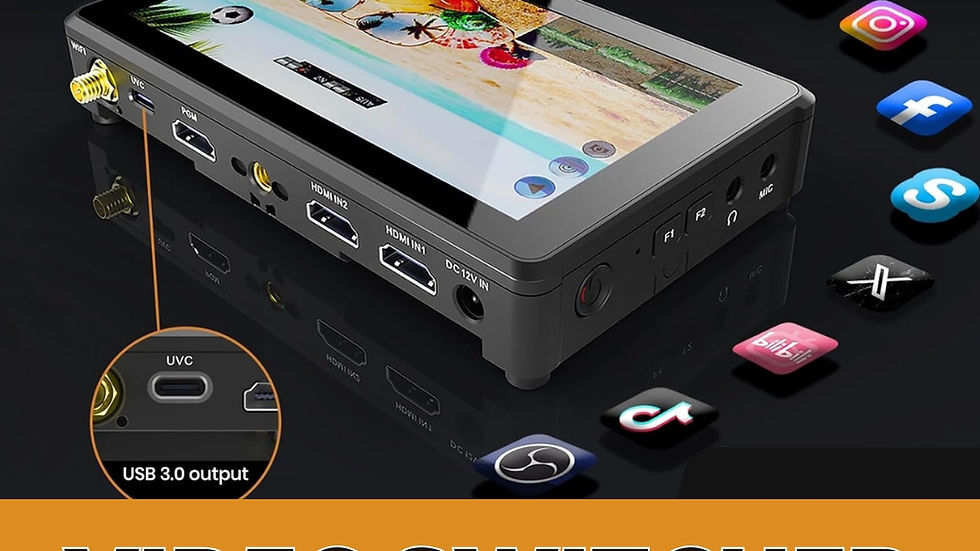
At the center of this evolution is the video switcher. More than just a tool to swap between cameras, today’s video switchers are becoming smarter, more connected, and future-ready. Let’s explore how video switchers are shaping the future of hybrid and online events, and the equipment you’ll need to stay ahead.
Why Video Switchers Matter in Hybrid Events
Hybrid events combine on-site production with virtual streaming. This means you need to deliver high-quality video to both the in-room audience (via projectors or LED screens) and the online audience (via YouTube, Facebook, Zoom, or custom platforms).
A video switcher ensures that:
Multiple camera angles (close-up, wide, stage, audience) are handled smoothly.
Presentations, slides, and videos are integrated into the live feed.
Graphics, logos, and lower thirds are added for branding.
Both live and online viewers get a professional, TV-like experience.
The Future Trends of Video Switchers
1. Cloud-Integrated Switching
Modern switchers are beginning to integrate with cloud platforms, enabling remote production.
2. Support for Hybrid Outputs
Future-ready switchers allow simultaneous output to projectors, LED walls, streaming encoders, and cloud services.
Example: RGB mini-ISO 10 with USB, HDMI, and streaming over Ethernet.
3. PTZ Camera Integration
PTZ (Pan-Tilt-Zoom) cameras are now widely used in hybrid events because they can be remotely controlled and reduce the need for multiple camera operators.
Switchers like VIDEOCAST HD mini or RGB link V3 integrate smoothly with PTZ controllers.
4. AI-Assisted Switching
Upcoming switchers will feature AI auto switching detecting active speakers, movements, or slides to switch automatically.
5. Wireless & Mobile Switching
Portable switchers and mobile apps allow event managers to control live switching on the go.
Example: VIDEOCAST wireless switchers with HDMI/SDI inputs and loop-out features.
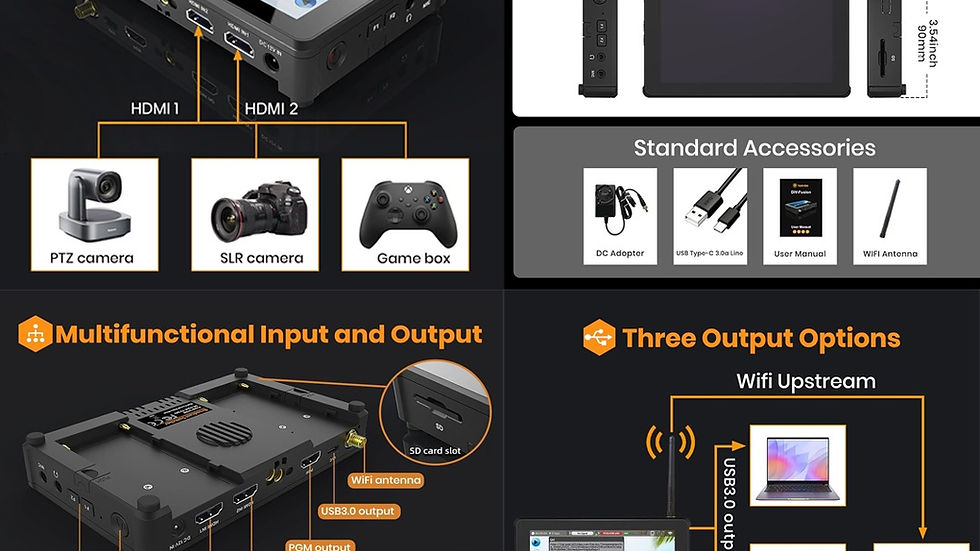
Essential Equipment for Hybrid & Online Event Switching
To set up a future-ready hybrid event production, you’ll need:
Video Switcher
This device is used in live production to seamlessly switch between multiple cameras, video sources, and graphics, delivering professional-quality broadcasts for events, streaming, and hybrid productions.
4K PTZ Cameras
PTZ cameras (Pan-Tilt-Zoom) are versatile video cameras that allow remote control of movement and zoom, making them ideal for live streaming, events, classrooms, and professional broadcasts.
Audio Equipment
Audio equipment includes microphones, mixers, speakers, and processors designed to capture, enhance, and deliver clear, professional-quality sound for live events, streaming, and recordings.
Video Encoders & Streaming Devices
Video Encoders and streaming devices convert video and audio signals into digital streams, enabling smooth live broadcasting to platforms like YouTube, Facebook, and Zoom.
Monitors & Displays
Monitors and displays provide real-time video previews and outputs, ensuring accurate monitoring and professional presentation during live events and broadcasts.
Preparing for the Next Generation of Events
The shift to hybrid and online-first experiences is here to stay. Event organizers can no longer rely on simple webcam setups; audiences expect broadcast quality production. By adopting advanced video switchers and supporting equipment, you can deliver engaging, professional, and future-ready events.
The future of video switchers lies in:
Cloud-based production
AI-powered automation
Seamless integration with PTZ cameras
Flexible hybrid outputs for both live and online platforms
If you’re planning your next hybrid event, investing in the right switcher and equipment will not just enhance the audience experience—it will future-proof your productions for years to come.
Conclusion
Setting up a video switcher for live production may feel complex at first, but with the right equipment and preparation, you can deliver a glossy, broadcast-quality live stream. From multi-camera switching to adding professional overlays, your production will stand out and keep viewers engaged. As your productions grow, you can expand your setup with wireless transmitters, PTZ controllers, larger switchers, and dedicated encoders. The key is to start simple, practice often, and upgrade as your needs evolve.
Contact Us
📧 Email: sales@skywirebroadcast.com
📞 Phone: +917042004116 / 9810361836
🌐 Website: www.skywirebroadcast.com
FAQ
1. What is a video switcher and how does it work in live streaming?
A video switcher is a production device that allows you to switch between multiple video sources such as cameras, laptops, and media inputs in real time. It enables smooth transitions, adds graphics, and delivers a professional live stream output.
2. Why is a video switcher important for hybrid events?
A video switcher ensures seamless integration of multiple video feeds, presentations, and branding elements, delivering a consistent and high-quality experience for both in-person and online audiences.
3. Can a video switcher stream directly to platforms like YouTube or Facebook?
Yes, many modern video switchers support direct streaming via USB, Ethernet, or built-in encoders, allowing you to broadcast live to platforms like YouTube, Facebook, and Zoom without additional hardware.
4. What features should I look for in a video switcher for live events?
Key features include:
Multiple HDMI/SDI inputs
Built-in streaming support
PTZ camera control compatibility
Multi-view monitoring
Recording (ISO or program output)
Graphics and overlay support
5. How do PTZ cameras work with video switchers?
PTZ cameras can be remotely controlled and integrated with video switchers, allowing operators to adjust angles, zoom, and presets without needing multiple camera operators, making them ideal for hybrid events.
6. What is the difference between a video switcher and a video mixer?
A video switcher focuses on switching between sources, while a video mixer combines multiple video and audio signals with effects, transitions, and overlays. In modern setups, most switchers include mixing capabilities.
7. Do I need a separate video encoder with a switcher?
It depends on the switcher. Some switchers come with built-in encoding for direct streaming, while others require an external video encoder to convert signals for online broadcasting.
8. What equipment is required for a professional hybrid event setup?
A complete setup typically includes:
Video switcher
4K PTZ cameras
Audio system (microphones, mixers)
Video encoders or streaming devices
Monitors and displays
9. Are wireless video switchers reliable for live production?
Yes, modern wireless video switchers are designed for stable, low-latency transmission. They are ideal for flexible setups, reducing cable clutter and improving mobility during live events.
10. What are the future trends in video switchers for live streaming?
Emerging trends include:
Cloud-based production workflows
AI-powered auto switching
Enhanced PTZ integration
Multi-platform streaming outputs
Mobile and remote control capabilities


Comments