.avif)


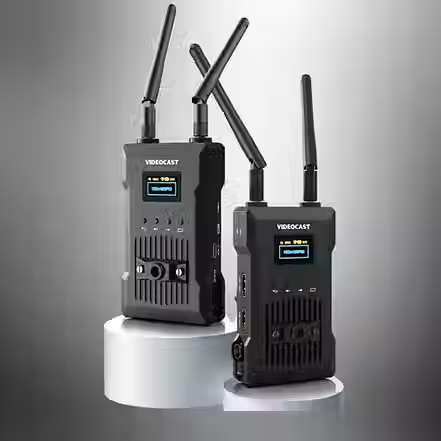
VIDEOCAST VC TX960 4K Wireless Video Transmitter & Receiver
The VIDEOCAST VC TX960 is a professional-grade 4K Wireless Video Transmission System designed for filmmakers, broadcasters, live event professionals, content creators, educational institutions, and AV integrators. It delivers reliable ultra-low latency wireless HDMI transmission with crystal-clear image quality and a transmission range of up to 450 meters (1500 ft) in line-of-sight conditions.
Featuring a bright LCD status display, the VC TX960 allows users to monitor connection status, signal strength, channel information, battery level, and video resolution in real time. Operating on the stable 5GHz wireless band with 20 manually selectable channels, it minimizes interference even in demanding RF environments.
The receiver also supports USB UVC output, allowing direct connection to a computer for live streaming without requiring an additional capture card. Compatible with OBS, vMix, Zoom, Teams, and other streaming platforms, the VC TX960 is ideal for professional live production, broadcasting, conferences, weddings, sports, education, and corporate presentations.
Connectivity & Compatibility
The VIDEOCAST VC TX960 works seamlessly with:
Cameras
DSLR Cameras
Mirrorless Cameras
Cinema Cameras
PTZ Cameras
Camcorders
Video Sources
HDMI Cameras
Video Switchers
Laptops
Media Players
PCs
Display Devices
Field Monitors
Production Monitors
Projectors
TVs
LED Walls
Streaming Platforms
OBS Studio
vMix
Zoom
Microsoft Teams
YouTube Live
Facebook Live
Twitch
Wirecast
Operating Systems
Windows
macOS
Installation & Setup
Step 1
Install all supplied antennas.
Step 2
Power both transmitter and receiver using:
Sony NP-F Battery
USB-C Power
DC Adapter
Step 3
Connect HDMI source to the transmitter.
Step 4
Connect receiver HDMI output to a monitor or projector.
Step 5
Power on both devices.
Step 6
The transmitter and receiver pair automatically.
Step 7
Begin wireless video transmission.
For live streaming, simply connect the receiver's USB UVC port to your computer using a USB cable and select it as a webcam source in OBS or other compatible software.